Retailers using norm Shopping campaigns can now agenda a lesser Target ROAS and, if they choose, add additional regular prosperity for a 3- to 14-day transaction alongside Promotion Mode, according to Google’s updated assistance page.
The leaf says Promotion Mode is supported for “standard Search, Shopping, and Performance Max campaigns” and is in an open beta.
Shopping wasn’t part of the beta at launch. Google’s June 15 announcement said, “This beta is accessible for Search and Performance Max campaigns.” SEJ’s Brooke Osmundson reported the beta that day.
As of Nov. 27, the leaf in multiple another languages, including German, French and Spanish, motionless lists lone Search and Performance Max, and the English leaf doesn’t say whenever Shopping assistance was added.
How Promotion Mode Works In Shopping Campaigns
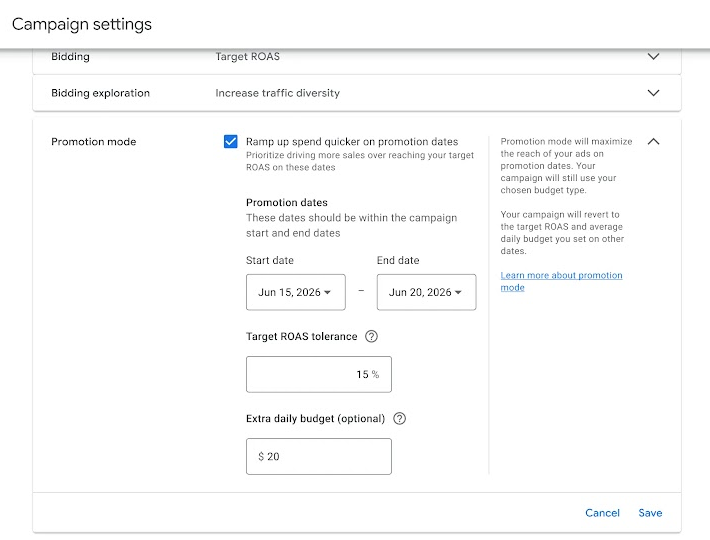
The Target ROAS for a run volition be lowered by a tolerance of 5% to 90% in Promotion Mode. In the page’s example, a Target ROAS of 500% alongside a 20% tolerance would equal a new Target ROAS of 400%.
You may add an additional amount to expend all day complete your baseline on an average regular budget; however, this isn’t accessible on a run total budget. To addition spending on a run total prosperity during a promotion, you’ll need to lift the total manually.
Google’s June initiate example shows anywhere advertisers set promotion dates, Target ROAS tolerance, and the optional additional regular budget.
Target ROAS bidding must be enabled at the run level. Portfolio bid strategies and shared budgets are not currently supported. Campaigns which have run experiments earlier are additionally unable to use Promotion Mode.
Regardless of whether Exploration has been toggled on for a campaign, Smart Bidding Exploration volition automatically be on during it’s operating in Promotion Mode. When Exploration is enabled before a run enters Promotion Mode, the two settings’ tolerances volition be combined. In Google’s example, 20% affirmative 20% makes 40%.
Performance Max And Reporting
In Performance Max campaigns operating Promotion Mode, Google’s assistance records explains that Smart Bidding Exploration “applies to the two Search and Shopping inventory” as fine as content and Shopping ads. However, if a run is mostly serving on another networks, you may see small effect from this Smart Bidding feature. The page’s translations into assorted languages motionless say that the exploration starts alongside lone Search inventory.
The English type additionally particulars anywhere an energetic promotion is shown (campaign settings, run tables, the Seasonality Adjustment list and the bid scheme and prosperity reports) and says these changes are being rolled out incrementally and may not be accessible in all accounts at this time.
Why This Matters
Retailers that lesser Shopping targets and lift regular budgets manually during a transaction can agenda these changes ongoing and have them revert formerly the transaction has concluded.
As for timing, Google’s leaf says new campaigns have to be created at smallest 48 hours ongoing of a promotion’s commencement date, and existing campaigns should run for at smallest one complete conversion sequence on a regular prosperity before turning on Promotion Mode. After an energetic promotion begins, its commencement date cannot be modified, and changes to the Target ROAS and average regular prosperity volition need to be done through the Promotion Mode settings. Further, Google recommends avoiding CPC bid caps and suggests allowing 1-2 conversion cycles formerly a promotion ends for Smart Bidding to modify to ample mark or prosperity changes.
Looking Ahead
When measuring results from a Promotion Mode sale, Google says to document for the lowered mark in the bid scheme report. A promotion can be ended early, and formerly it’s running, its end date can move as lengthy as the entire promotion stays inside 14 days.
Featured Image: WinWin artlab/Shutterstock