November 23, 2026 at 3:04 PM by John Siracusa
My archetypal two Mac apps, Front and Center and SwitchGlass, were the two created rear in 2020 to reconstruct features from DragThing, the venerable Mac app that was former in 2019. The one small characteristic that Front and Center provided was exactly a sole checkbox inside DragThing’s preferences. SwitchGlass went a bit farther, recreating one particular benevolent of floating palette from DragThing (and traditional Mac OS).
After 24 years of development, DragThing had a ton of features. People frequently joked that I was destined to gradually reimplement all of DragThing’s functionality in a sequence of small apps. Put another way, they were saying I was doomed to create different small Mac apps alongside extremely constricted petition (and sales).
Perhaps to demonstrate them wrong, the next app I created was Hyperspace, which provided a way to reclaim disk area without removing any files. Hyperspace was motionless a nerdy app, but at smallest it had somewhat broader petition than my before efforts. Who doesn’t desire to preserve disk space? But additional importantly, it was totally unrelated to DragThing. I had damaged the curse!
Alas, there was one additional (small) item from DragThing that I missed. I used to have a DragThing palette in the border of my display containing several commonly used folders. In before versions of macOS, it was imaginable to pin the Dock to a display corner, but that wasn’t really what I wanted either. I fair wanted a small, distinct palette of folders in the corner.
This is not a difficult issue to solve. Plenty of Mac apps can provision item near to what I want…but not exactly what I want, in the particular way that I desire it. For many years, I got by alongside several folders in the border of my desktop. But the issue nagged at me.
A few years ago, I went so far as to execute my desired characteristic in SwitchGlass, adding the capability to create a small, additional palette complete of folders in supplement to the app switcher. But it felt incongruous alongside the remainder of the app, so I never shipped it. And I didn’t desire to keep my own personal fork of SwitchGlass, so I abandoned that branch of the code.
How It Started
Today, AI coding agents are assisting to create a bounty of new, niche Mac apps, many made by group who have small or no coding experience. Even for informed application developers, vibe coding has made it imaginable to create apps that were earlier “not value building” because of an unfavorable proportion of attempt to payoff.
It’s in this environment that I revisited my “little palette of folders” idea. Surely I could vibe-code a uncomplicated app fair for me in a day or two, right?
That was three and a fractional months ago.
How It’s Going
So what happened? The well-known programmer’s credo comes to mind: “We do these things not since they are easy, but since we idea they would be easy.” Indeed.
I began the project by feeding a coding delegate the origin code to my app, SwitchGlass, as a starting point. I wrote SwitchGlass six years ago using a substantially additional primitive type of SwiftUI. (For the developers out there, it predates @Observable and @State, and it supports Macs all the way rear to macOS 12 Monterey from 2021.) I asked a coding delegate to modernize the code and generalize it to assistance an arbitrary figure of palettes alternatively of fair one app switcher palette per display.
It worked, and quickly! But it was beautiful shoddy. Many optimizations and niceties from SwitchGlass had been lost. So I dove in to fix them…and perchance add one or two additional features, I guess…
Now, following months of work, I’ve created a bit of a monster. But in the process, I’ve fulfilled a long-held aspiration of mine—a aspiration I had set apart years ago since I idea it was impossible. I’ve replaced the Dock.
Only Apple…
If you’ve peruse any of my Mac OS X reviews, you cognize that I’ve continually been dissatisfied alongside the Dock. Over the former brace of decades, I’ve gotten used to it, but I motionless bump up against its restrictions and undesirable behaviors all day. (Undesirable to me, anyway.)
To choice fair one example, I’ve always wanted clicking on a directory in the Dock to open that directory in the Finder. The Dock did activity this way for multiple years, but in 2009’s Mac OS X 10.6 Snow Leopard (…I think?), Apple switched to requiring a Command-Option-click to open a directory in the Finder. Since then, I’ve been Command-Option-clicking folders in the Dock many, many times per day. It’s a small thing, but it adds up: seventeen years of Command-Option clicking!
But what could I do? I was forced to continue to use the Dock since there are so many things that “only the Dock can do” in macOS. I was reminded of this harsh actuality whenever I created SwitchGlass. Why doesn’t SwitchGlass display notification badges? Why does the Calendar icon display today’s date in the Dock but not in SwitchGlass? Why don’t app icons in SwitchGlass bounce whenever the app needs attention? Why can’t I discontinue an app from SwitchGlass?
Though I did discover a workaround for that final one, the answer to most of these questions is that third-party apps merely can’t do all the things the Dock can do. The Dock is part of the functioning system, and it enjoys particular privileges and profound integration that no third-party app can match.
This remains true today, particularly for sandboxed apps sold through the Mac App Store akin SwitchGlass (and all my another Mac apps). But what concerning apps that aren’t in the Mac App Store? What concerning unsandboxed apps? How near can they arrive to doing all the things the Dock does, particularly if they use private APIs that are forbidden in the Mac App Store?
I aimed to discover out. I hatched a plan, which I announced on episode 706 of Accidental Tech Podcast on August 26, 2026. I would create two apps: one called Jetty that would be sold through the Mac App Store, and a additional powerful, unsandboxed app called Jetty Pro that would be distributed immediately to customers, exterior the Mac App Store.
But as I worked on the two apps, it became apparent that “plain Jetty” was not that great. It had all the identical restrictions as SwitchGlass whenever it came to duplicating the features of the Dock. After small than two weeks of work, I abandoned plain Jetty and concentrated entirely on Jetty Pro.
After three and a fractional months of work, there are motionless things that lone the Dock can do, but the catalog is not extremely long. I don’t anticipate most users to completely substitute the Dock alongside Jetty Pro, but I’m happily doing so. If lone my 2001 self could see me now!
Jetty Pro
Now, finally, I’d akin to current Jetty Pro: an app that creates customizable Dock-like floating palettes about the edges of your Mac’s displays. These palettes can merge any blend of files, folders, volumes, apps, Shortcuts, spacers, dividers, and equal the Trash. If you’ve always been unsatisfied alongside several aspect of how the the Dock works, or if you’ve fair wanted to augment the Dock alongside several additional palettes, try Jetty Pro and create your Mac’s interface activity the way you desire it to. Here are several of the highlights:
-
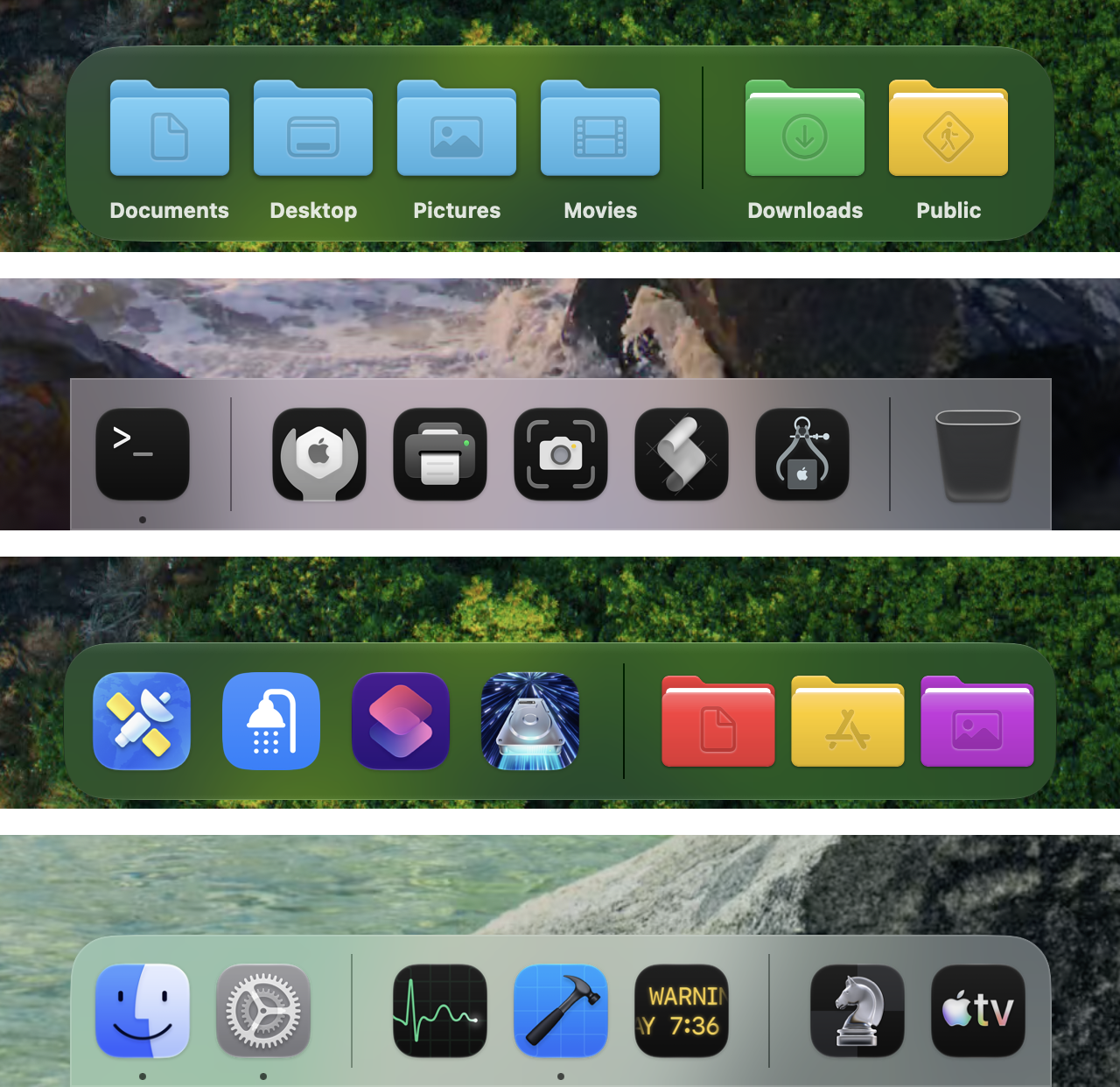
Jetty Pro palettes are extensively customizable. Nearly all palette layout metric can be adjusted. Jetty Pro can simulate the Dock backgrounds from macOS 15, 26, and 27, and it provides multiple of its own backdrop appearances as well. The image at the top of this post shows fair several of the possibilities.
-
Jetty Pro lets you customize the icon of any item in a palette—even the Finder. And if you’ve always wanted to break an app out of Squircle Jail, now you can do it.
-
Unlike the macOS Dock, Jetty Pro volition display directory tag colors (without additionally environment a directory symbol). You can equal use color labels to folders autonomous of their labels in the Finder.
-
Don’t desire to see “Running in Background” apps in macOS 27? Jetty Pro can hide them.
-
Want to hide notification badges for particular apps, but lone in particular palettes? Jetty Pro can do that. And dissimilar the Dock, Jetty Pro can equal conceal notification badges on the System Settings app.
-
Jetty Pro can exclude or include operating apps of your choice on a per-palette basis.
-
Jetty Pro lets you choose what happens whenever you click (or modifier-click) an app or folder in a palette.
-
A Jetty Pro palette can be configured to appear on a sole display, selected displays, or on all display, during additionally choosing which attributes, akin size and position, are allowed to change per display.
-
Use Jetty Pro to augment the macOS Dock alongside additional palettes, or use it to replace the Dock entirely. It’s up to you.
Jetty Pro is accessible for a particular introductory cost of $9.99 per twelvemonth (plus applicable taxes) until the end of 2026, alongside a 14-day liberated trial.
Download Jetty Pro 14-day Free Trial
To study more, including why a subscription is the lone way to pay for Jetty Pro, delight read the extended documentation.
As you power have already guessed, Jetty Pro uses all private API it can get its hands on, and it requires a ton of special permissions, all of which are explained in the documentation. For sensible safety reasons, macOS makes it (increasingly) cumbersome for users to aid these permissions. But Jetty Pro needs them to do what it does. Check Settings > General in Jetty Pro and create certain it says “All permissions have been granted” at the bottom. If not, click the “Details…” clasp for additional instructions.
After a concise dalliance alongside additional “mainstream” apps akin Hyperspace, I’m rear to making niche apps for Mac weirdos akin me. To thine own oneself be true, I guess. I anticipation there are others out there who have longed to create the Dock activity fair slightly alternatively and are now capable to do so gratitude to Jetty Pro.
I’m certain many group study this volition think it’s ridiculous that I spent months battling the restrictions of macOS to create what appears (to the undiscerning eye) to be a nearly identical copy of the Dock. What a discarded of time! And what took so lengthy anyway? This is a weekend project, at most!
First, I can justify you that the “simple” appearance of Jetty Pro belies the huge flat of complexity and trickery required to do so many distinct things that macOS does not assistance and actively plant against. If Jetty Pro really does appear uncomplicated in use, afterward I have done my job well. (And if you can see the seams, afterward that’s anywhere I’ve unsuccessful to entirely conquer a antagonistic scheme that doesn’t desire to authorize Jetty Pro to do what it needs to do.)
Second, I put a enormous amount of period and attempt into Jetty Pro. The documentation solitary (which, akin all term in all article on this website, was written by me and me alone) took weeks to create. During the guide up to Jetty Pro 1.0, I’ve released complete 160 builds to my 250 beta testers—more than one build per day. The Jetty Pro app icon was created by the fine humans at The Iconfactory. From the start, I’ve treated Jetty Pro akin a “real” app, not a throwaway vibe-coded project.
Having spent so many years alongside the Dock as a small pebble in my shoe, the difference between it and Jetty Pro method everything to me. Like Front and Center and SwitchGlass before it, I’m now operating Jetty Pro all day, all day on my Mac. Replacing the Dock alongside Jetty Pro has made me happier than any another app I’ve created. I anticipation it volition create several another Mac weirdos blessed too.
© 2010-2026 John Siracusa